


Nearly every job description for a designer asks for attention to detail, and almost none says what it means. In product interfaces it is not a matter of taste: the same button, label, and spacing decision is repeated across hundreds of screens, so one lapse gets multiplied and one careful choice does too. Users judge the parts of a product they cannot see by the parts they can, which is why a misaligned label costs more trust than its size suggests. Design systems and design QA exist to make the habit cheaper, not to replace it.
In this glossary topic:
- What is attention to detail?
- What details does attention to detail cover in an interface?
- Why does attention to detail compound in product interfaces?
- What does attention to detail look like in a design review?
- How does attention to detail relate to craft, polish, and QA?
- How does attention to detail differ from pixel perfection and perfectionism?
- What does attention to detail look like in practice?
- FAQ

What is attention to detail?
Attention to detail is the habit of getting the small parts of an interface right: the alignment of a label to its field, the spacing between repeated elements, the hover, focus, loading, empty, and error states of a component, the copy on a button, and the behavior at the edges where names are long and lists are empty. In product design it names both a quality of the work, which a reviewer can see, and a working habit, which shows up in the questions asked before a screen is called done.
The definition that holds up is about completeness rather than polish. A detailed design accounts for every state a component can be in and every kind of content it has to hold, and it stays consistent with the rest of the product while doing so. Attention to detail is noticing what the design has not yet decided, and deciding it before a user or an engineer has to. That includes what happens when a 40-character name meets a 20-character column.
What details does attention to detail cover in an interface?
The details cluster into a handful of categories. Consistency: the same action looks the same everywhere, the same word means the same thing, and spacing follows one scale instead of several. Alignment: elements share edges and baselines, so that nothing sits a few pixels off in a way the eye registers before the mind does. Element states: every interactive component has its hover, focus, active, disabled, loading, error, and empty appearance designed rather than left to the browser default. Copy: labels, errors, and helper text are specific, in the product's voice, and spelled and capitalized the same way throughout. Edge cases: long text, missing data, zero results, slow connections, the first run. Accessibility details: contrast ratios, focus order, touch target size, text alternatives, and whether meaning is carried by color alone.
Each category is small on its own. What makes the list matter is that users meet all of the categories together, on one screen, and the screen reads as careful or careless as a whole. A beautifully typeset form with a disabled state nobody designed looks, to the person who hits it, like a form nobody finished.
Why does attention to detail compound in product interfaces?
Software interfaces are built from repeated parts. A button is designed once and used a thousand times; a spacing value is set once and applied to every card. That repetition means a detail done right is multiplied across the product, and a detail done wrong is too. Design systems exist largely to capture this: they encode the small decisions, the 4-pixel spacing scale, the focus ring, the disabled opacity, so that every screen inherits them. The Interface Inventory as the Foundation of Design Systems lesson shows what accumulates without one: dozens of button styles nobody chose.
Users respond to the sum. Nobody consciously notices a consistent 16-pixel gutter, but a product where the gutters wander feels cheaper, and people call it clunky without being able to say why. Small lapses also carry information: a misspelled label or a broken state in a banking app makes people wonder what else was not checked. Perceived quality is built from details nobody can name and lost through details anybody can spot.
The same mechanism works in the other direction: trust in a product is earned interaction by interaction, through a confirmation that appears when expected and an error that says what to do next. The Building User Trust lesson treats demonstrated attention to detail as one of the signals users read when deciding whether a product can be relied on.
What does attention to detail look like in a design review?
Picture a design review of a settings page that the designer considers finished. The first reviewer zooms to 200 percent and finds a toggle row whose label sits 2 pixels lower than the others. The second asks what the page shows a user with no connected accounts, and there is no empty state. The third tabs through the form and finds no visible focus. The fourth reads the copy aloud and hears "Sign in" on one button and "Log in" on another. None of these is a wrong direction; each is a decision the designer had not made, and the page would have shipped with an engineer making it instead.
Reviewers who look for detail work from a mental checklist: states, content extremes, keyboard and screen reader paths, consistency with neighboring screens, and copy. The signature of attention to detail in a review is that the questions have been answered before anyone asks them. At the scale of a whole product the same review becomes an interface inventory, a catalog of every button, heading, and form field in use.
How does attention to detail relate to craft, polish, and QA?
The four words are used loosely and overlap. Craft is the broader competence: the ability to make a design good, which includes judgment about hierarchy, flow, and fit as well as detail. Polish is the final pass that refines a design already judged correct: the easing on a transition, a shadow that reads better. Attention to detail runs underneath both, as the habit that notices what craft should fix and what polish should refine. Design QA is the formal step, late in delivery, in which someone compares the built product to the design and files the differences; it catches what attention to detail missed or what implementation lost.
The distinction matters for where the time goes. A team that relies on QA to find missing states pays for each one twice, once to find it and once to fix it in code, when the designer could have specified it in minutes. A team that confuses polish with detail ships beautifully animated screens with no error handling. Detail is a habit practiced throughout the work, polish is a stage near its end, and QA is the check that both happened.
How does attention to detail differ from pixel perfection and perfectionism?
Pixel perfection describes a build that matches the design file exactly, a reasonable goal for the parts of an interface a system defines. As a standard for all work it misleads, because a design is drawn for a few screen sizes and a few content lengths while the product meets thousands of each. The detail that matters is whether the layout holds when the text wraps and the viewport shrinks, not whether a padding value survived unchanged. Attention to detail asks whether the right things were decided; pixel perfection asks whether one artifact was reproduced.
Perfectionism is the failure mode on the other side. It treats every detail as equally important and delays shipping until all of them are resolved. Attention to detail without a sense of priority among the details produces a team that argues about icon stroke weight while the checkout error state remains undesigned. The skill includes knowing which details a user will meet first and most often, finishing those, and writing down the rest. A designer with good attention to detail ships on time with the known gaps listed; a perfectionist ships late with the gaps still unknown.
What does attention to detail look like in practice?
One of the commonest lapses on a single screen is a set of buttons that do not agree with one another: a filled yellow rectangle beside a gray pill beside a dark square that holds only an icon, three styles for three sibling actions in a single row. Each button was designed acceptably on its own, usually at different times by different people, and the inconsistency appears only when they meet. A reviewer with attention to detail sees the mismatch before reading a word. The fix is one decision, a single button style applied everywhere, and the discipline to check for it on every new screen.
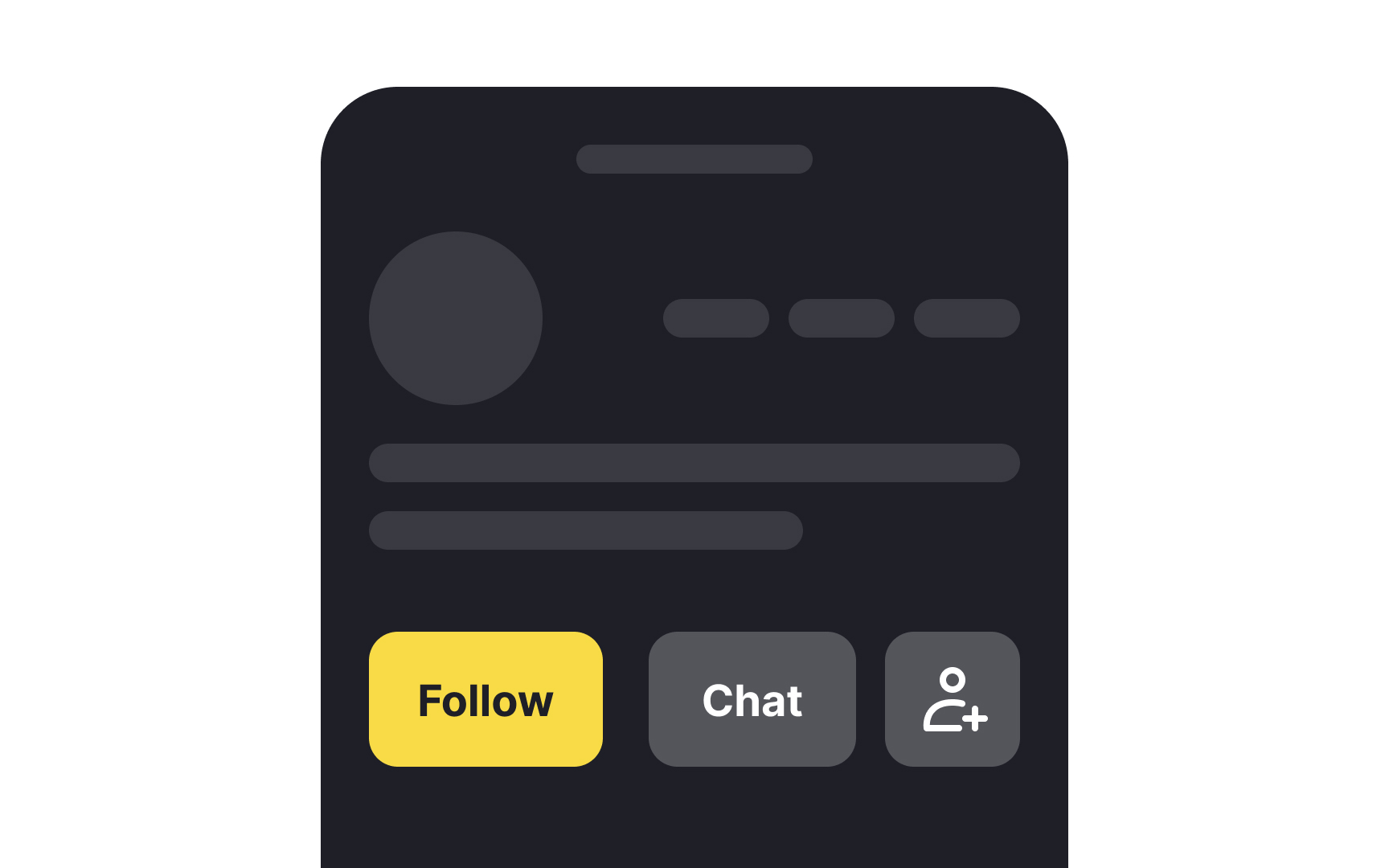
Three sibling actions in three button styles on one card: the shapes, colors, and label treatments each look fine alone and disagree as a row, the kind of detail that is invisible in a component file and obvious on the screen. From the lesson Best Practices for Designing UI Buttons.


