


Design tools make it as cheap to draw a finished-looking screen as a rough one, which has quietly made wireframing a choice rather than a default stage. The choice still matters: a layout that is debated in gray boxes gets argued about on structure, and the same layout in brand colors gets argued about on taste. Wireframes are the cheapest point in a project at which a structural mistake can still be thrown away.
In this glossary topic:
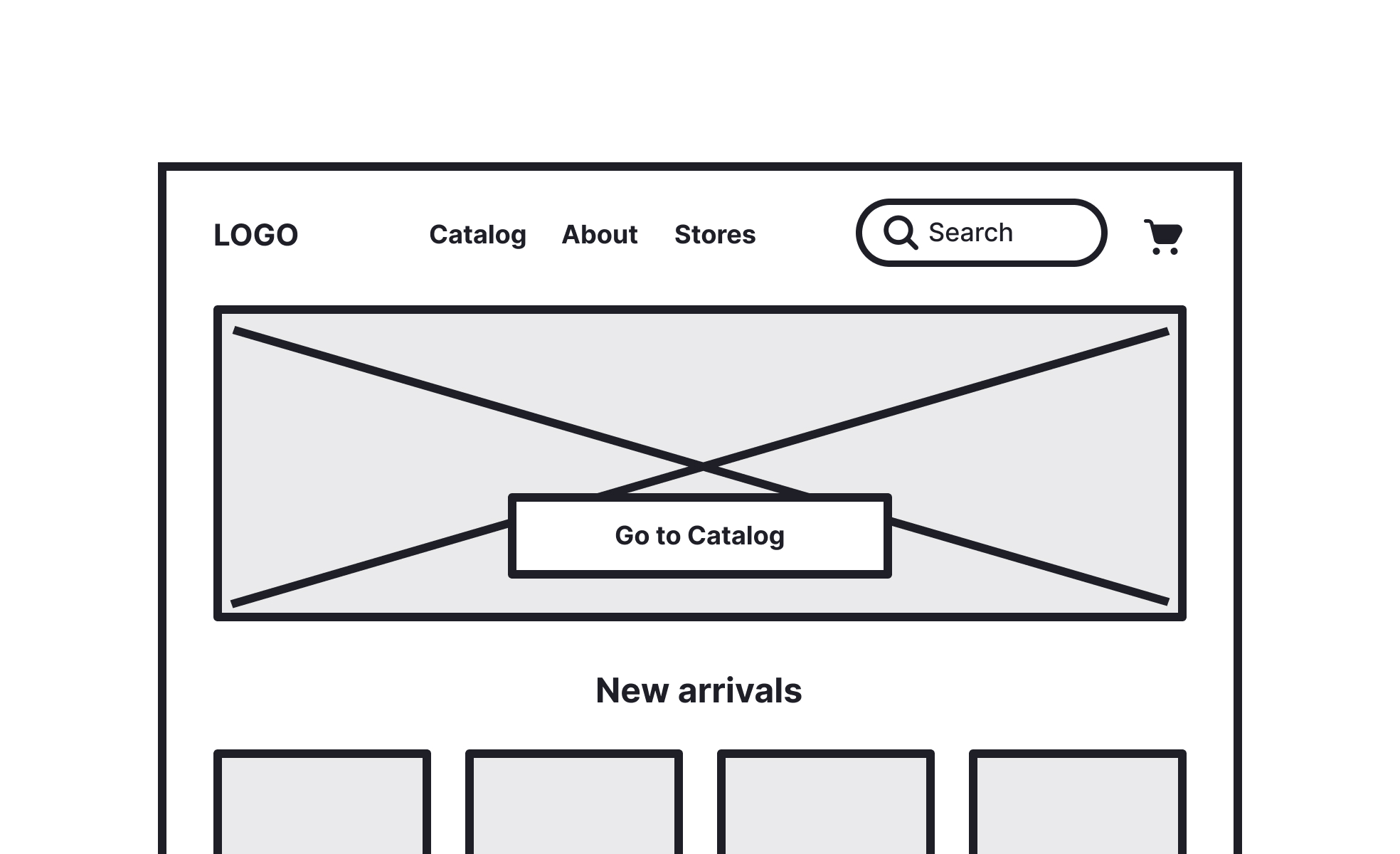
What is a wireframe?
A wireframe is a stripped-down representation of a digital interface, built to communicate structure and function rather than visual style. It typically uses simple boxes, lines, and placeholder text to show where content, navigation, buttons, and other elements will sit on a screen, without any attention to color, typography, imagery, or final styling.
The deliberate crudeness of a wireframe is a feature, not a limitation. It keeps conversations focused on whether a layout makes sense, whether a user flow is logical, and whether the right content is in the right place, rather than drifting into discussions of font choices or color palettes. Teams often discover significant structural problems in wireframes that would have been far more expensive to fix after visual design or development had already begun.
Wireframes sit early in the design process, typically after initial research and before high-fidelity mockups. They can range from hand-drawn sketches on paper to digital files in tools like Figma, Balsamiq, or Axure, depending on how much detail is needed and who needs to review them.
What are the different fidelity levels of wireframes?
Wireframes exist on a spectrum from very rough to fairly detailed, and the appropriate fidelity level depends on what questions the team is trying to answer at a given stage.
- Low-fidelity wireframes are the roughest representations: boxes for images, lines for text, simple shapes for interface elements. They're fast to produce and disposable by design. Their value is in generating and discarding ideas quickly, exploring multiple structural directions without attachment to any particular one. Paper sketches fall into this category, as do early digital wireframes meant only for internal discussion.
- Mid-fidelity wireframes add more detail: actual labels on buttons, approximate content areas, real navigation structures. They're detailed enough to communicate a specific structural direction to stakeholders or cross-functional collaborators, but still clearly not final designs. Most wireframe reviews in product development happen at this level.
- High-fidelity wireframes are detailed and sometimes interactive, approaching the completeness of a mockup but still without full visual design. They're used when the structural and functional decisions are largely settled and the team needs to test more specific interactions or prepare a closer reference for development.
Why are wireframes used in UX design?
Wireframes serve several distinct purposes in a design process, and the specific value they provide depends on which stage they're being used at and who's involved.
- For exploring and comparing ideas, wireframes allow rapid iteration. A designer can sketch five different navigation structures in the time it would take to build one in a high-fidelity mockup. That speed makes it practical to genuinely explore before committing to a direction.
- For stakeholder alignment, wireframes give non-designers a concrete artifact to react to without the distraction of visual design decisions. When a stakeholder reviews a wireframe, their attention stays on structure, content priority, and user flow rather than whether the blue is right or the logo is big enough.
- For usability testing, even low-fidelity wireframes can surface significant usability problems. Users can complete task scenarios with paper prototypes and reveal navigation confusion, labeling issues, and content hierarchy problems long before a product is built.
- For developer handoff, wireframes establish structural and functional expectations before visual design is final. They give developers enough to begin architectural work and flag technical constraints early, reducing the back-and-forth that happens when developers first encounter a finished design.
What's the difference between a wireframe, a mockup, and a prototype?
These three terms describe different stages of design output, and they're often confused because the boundaries between them have blurred as design tools have become more capable.
- A wireframe is a structural representation: what goes where, and what is it. It doesn't show visual styling and typically isn't interactive.
- A mockup is a high-fidelity static representation of the final visual design: what it looks like in its finished state, with real colors, typography, and imagery. It's a design artifact meant to communicate appearance rather than behavior.
- A prototype is an interactive simulation of the product: something a user can click through to experience a flow or test a specific interaction. Prototypes range from low-fidelity (clickable wireframes) to high-fidelity (near-pixel-perfect simulations).
Wireframes come first, mockups follow once structure is settled, and prototypes are used to test either structural or visual decisions interactively. In practice, these stages can blur, particularly as tools like Figma allow teams to move between them fluidly.
What does a wireframe look like in practice?
The low-fidelity wireframe is the form most people picture when they hear the word. Every element is reduced to the shape that says what it is: a crossed box for an image, a run of lines for text, a plain rectangle for a button, and nothing on the screen invites a comment about style.
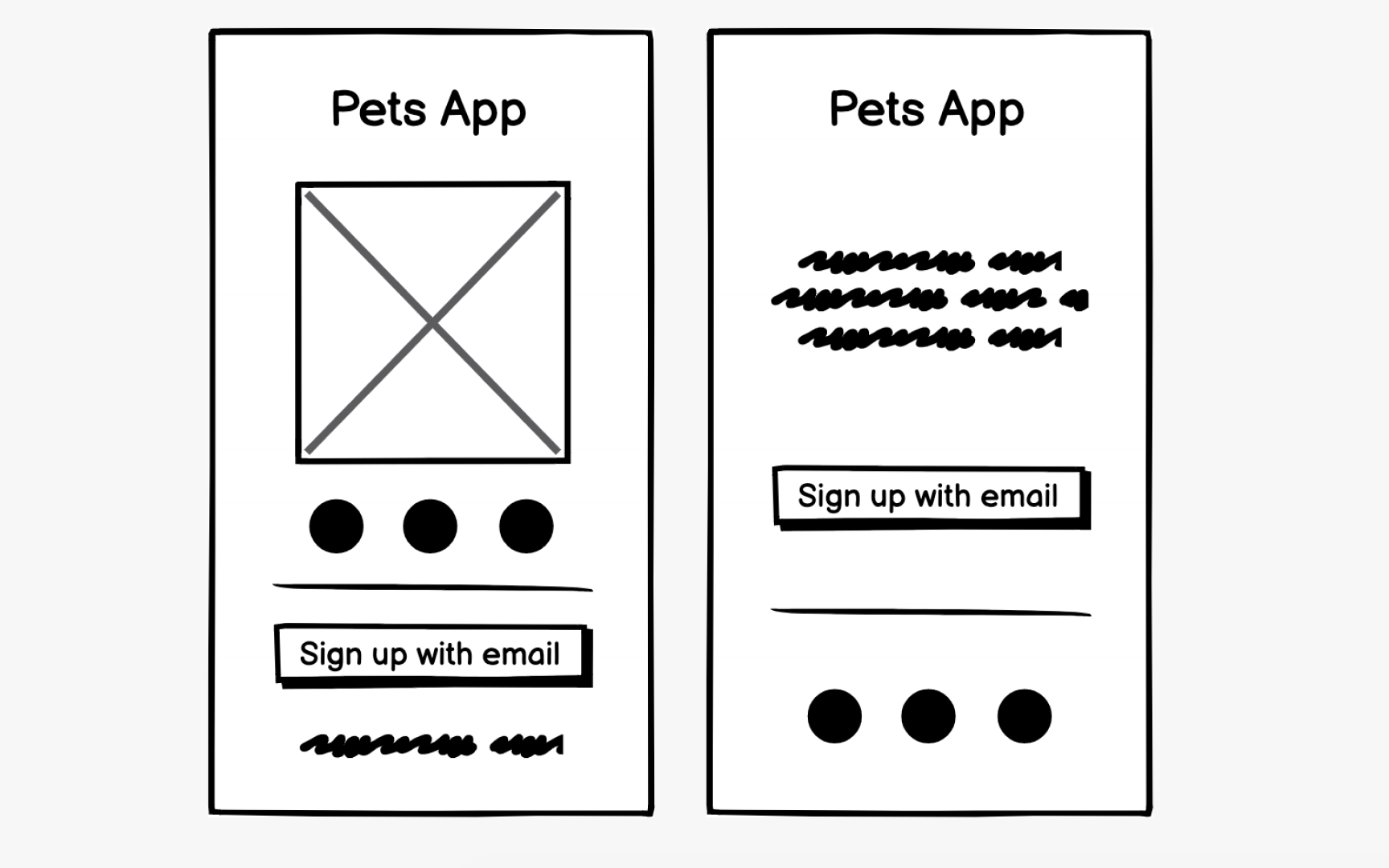
Two low-fidelity wireframes of the same screen: a crossed box stands in for the image, scribbles for the copy, and a plain outlined button for the call to action, so the review is about where the sign-up sits and what comes first, not about style. From the lesson Wireframe Fidelity.
How has wireframing changed lately?
Two things have shifted wireframing practice in recent years: the consolidation of design tools and the emergence of AI-assisted generation.
Most design teams now wireframe directly in the same tool they use for high-fidelity design, typically Figma. This has reduced the friction of moving from wireframe to mockup, but it has also created a temptation to skip wireframing or conflate it with early visual design. Teams that use dedicated wireframe components or maintain the deliberate constraint of low-fidelity early stages tend to get more out of the wireframing phase.
AI tools can now generate wireframe-level layouts from text prompts. Uizard and Figma Make can produce a rough screen structure in seconds from a description. This changes the blank-canvas problem: it's faster to generate a structural starting point and then critique it than to start from nothing. The limitation is that AI-generated wireframes tend to reflect common patterns, which makes them useful for standard screens but less useful for novel interactions or unconventional product concepts where fresh structural thinking is the whole point.
The underlying value of wireframing remains unchanged: catching structural and flow problems cheaply, before visual design and development have invested significant time in a direction that may need to change.


