


Interfaces moved from page loads to continuous, animated state changes, and every product now ships with motion whether or not anyone designed it. Platform guidelines treat animation as part of the interface language, design systems publish motion values alongside color and type, and operating systems let users turn movement down. The question is no longer whether an interface should move but what each movement is for, and motion design is the discipline that answers it.
In this glossary topic:
- What is motion design?
- What does motion do in an interface?
- What is the vocabulary of motion design?
- How does motion design differ from motion graphics and animation?
- How is motion design specified and built?
- How do accessibility and performance constrain motion design?
- What does motion design look like in practice?
- What does motion design mean for designers and product managers?
- FAQ

What is motion design?
Motion design is the use of animation and transition in a product interface to communicate: where something came from and where it went, what state the system is in, what matters most on the screen, and whether an action worked. It is the time dimension of interface design, the part that decides how a change looks between the moment before and the moment after.
Unlike motion graphics made for film and advertising, an interface animation is not watched; it is passed through on the way to a task, and it is judged by whether the task got easier. Motion in a product is communication first and expression second, and the discipline exists to keep that order straight. Apple's platform guidelines and Google's Material Design both treat motion as a system-level part of the interface language.
What does motion do in an interface?
Five jobs account for nearly all functional motion. Orientation: a panel that slides in from the left edge tells the user where it lives and where it will return. Feedback: a button that depresses on press, a checkmark that draws itself on success, a field that shakes on an invalid entry. Continuity: when a card expands into a detail screen and the same image travels between the two, the user keeps their place. Attention: a brief pulse on a new badge draws the eye without a sound. Character: the bounce, weight, or snap a product gives its movement is part of its brand.
A sixth job sits between these: filling time. Progress indicators, skeleton screens, and loading animations do not shorten a wait, but they tell the user that the wait is expected and still in progress, the subject of the How to Design Loaders to Keep Users Engaged lesson. A transition earns its place by answering a question the user would otherwise have to ask.
What is the vocabulary of motion design?
Duration is the length of a movement, measured in milliseconds; most interface transitions last a fraction of a second, and small changes run shorter than large ones. Easing is the curve that governs speed across that duration. An ease-out curve starts fast and slows into place, which suits elements entering the screen. An ease-in curve starts slow and accelerates away, which suits elements leaving. Ease-in-out combines the two for movement that stays on screen.
Keyframes define an animation by its start and end states, with the software interpolating between them along the chosen curve. Physics-based or spring animation instead defines mass, stiffness, and damping and lets the motion settle the way a real object would. Choreography is the ordering and offset of several elements moving together. State transitions cover changes between component states such as hover and pressed; shared element transitions carry one element across two screens. The twelve principles of classical animation inform all of this, and anticipation, follow-through, and squash and stretch show up in interfaces in diluted form.
How does motion design differ from motion graphics and animation?
Animation is the general technique: making something appear to move by showing a sequence of changing frames or states. Motion graphics is animation applied to type, shapes, and illustration in media that are watched, such as title sequences and explainer videos. Motion design in the product sense is animation applied to an interface that is used.
The differences follow from that. Motion graphics is expressive and narrative and holds attention on purpose. Interface motion is functional and incidental; it runs in the gaps between taps and should hold attention only as long as the change takes. Motion graphics is measured in seconds, interface motion in milliseconds. A motion graphics piece is rendered once; an interface animation runs live on the user's device, interrupts, reverses, and adapts to system settings. The two fields share tools and principles and almost nothing else, which is why skill in one does not by itself predict skill in the other.
How is motion design specified and built?
In a mature product, motion lives in the design system as a set of tokens: named durations such as short, medium, and long, and named easing curves such as standard, decelerate, and accelerate, which components reference by name. Material Design publishes its motion tokens this way, and a change to one value then propagates everywhere.
Design happens in prototyping tools, dedicated motion tools, or code. Delivery takes several forms: Lottie files, a JSON format that renders vector animation on web and mobile; the native animation APIs of each platform, such as CSS transitions on the web; and spring libraries for gesture-driven motion. The handoff that matters is timing and easing, not a video of the result, so a specification names the duration, the curve, the delay, and what interrupts the animation.
How do accessibility and performance constrain motion design?
Motion can harm. Large movements, parallax, and zooming can cause dizziness or nausea in people with vestibular disorders, and flashing content can trigger seizures in people with photosensitive epilepsy, which the Designing for Epilepsy lesson covers. Every major operating system now exposes a reduce-motion setting. Honoring it is a baseline requirement of accessibility, and the usual response is to replace movement with a crossfade or an instant change that carries the same meaning.
Motion can also obstruct. An animation the user has to wait for before the next action is a delay in costume, and an uninterruptible transition punishes anyone who already knows where they are going. Animation also runs on the user's hardware: animating layout, large shadows, or blur on a low-end phone drops frames. Motion that is cheap to render and easy to skip is the only kind that is safe to ship broadly, which is why systems favor transforms and opacity, short durations, and a reduced-motion path.
What does motion design look like in practice?
Picture a settings toggle. Off, it sits gray on the left; on, it sits colored on the right. The motion design question is everything in between: how long the knob takes to travel, whether it eases out as it lands, whether the track color crossfades or snaps, whether the phone taps back at the end (the territory of multi-sensory design), and what happens if the user flicks it twice in quick succession. Answered badly, the toggle lags, overshoots, or ignores the second tap.
The same questions scale up to a screen transition or a drag-to-dismiss sheet. A motion specification is a short list of numbers and curves attached to a state change, and the keyframe timeline below is the simplest form that list takes.
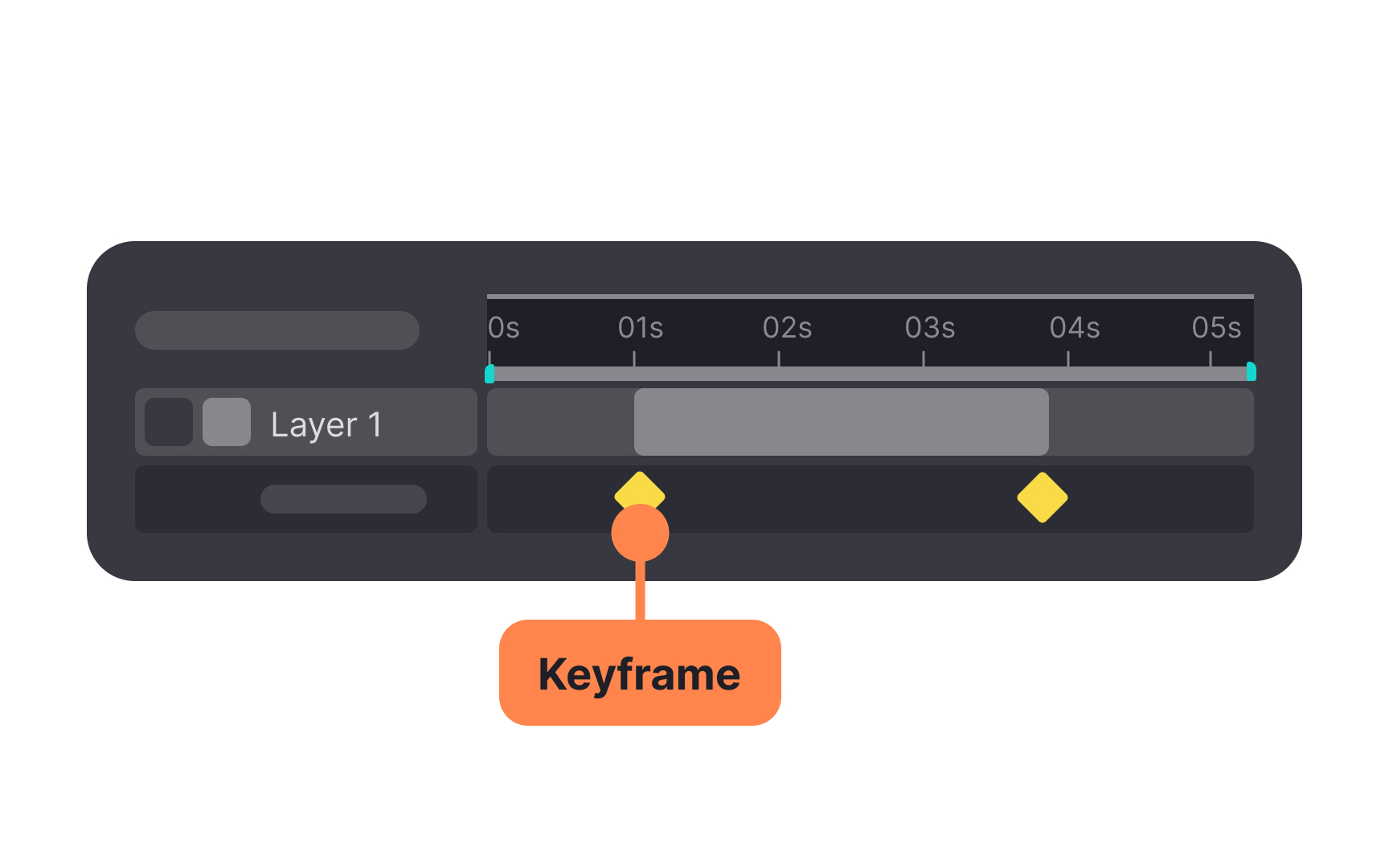
A timeline with two keyframes: the diamonds fix the states the element must pass through, and the frames between them are left to the easing curve, which is why a handoff that names the keyframes, the duration, and the curve is enough to rebuild the motion in code. From the lesson Animation Theory & Motion.
What does motion design mean for designers and product managers?
For designers, motion is a layer of the design system to own, not an effect to add at the end. The work is defining the tokens, pairing each component state with a transition, and deciding what should not move at all. Microinteractions are the natural unit for this work, since each has a trigger, a rule, and feedback, and feedback is where the motion decision sits. Prototyping tools make the intended motion reviewable before any code exists.
For product managers, motion is a cost and a claim. It takes engineering time, and a few hundred milliseconds can make a product feel either refined or sluggish. Whether a transition helps is testable: task time, error rate, and whether users can describe what just happened, measured with and without the animation. A transition that cannot be shown to help should be shorter, and one that cannot be shown to help at all should be removed.


