

The green Merge pull request button looks like the end of the process, but on many projects it's the moment a change goes live. Customers might see it within minutes, so it deserves a deliberate look rather than a reflex. Merges are also hard to take back quietly: once others build on a change, reversing it becomes a project of its own.
Before merging, GitHub shows a summary of everything that matters: whether reviewers approved, whether automatic checks passed, and whether the branch conflicts with its target. Repository rules can require some of these before the button even works. The button itself offers three merge methods that shape how the project's history looks afterwards: keeping every commit, squashing them into one, or replaying them in a straight line. A merge can also be set to happen automatically once every requirement is met, and some pull requests are better closed than merged at all.
Merging safely means reading that summary every time. It also means knowing what the merge will trigger, like a deployment, before pressing the button. A merge that skips its checks saves seconds and can cost an afternoon of fixing.
When a pull request is ready to merge
A pull request is ready to merge when three things line up: the right people have approved it, its required checks have passed, and its branch doesn't conflict with the base. The merge box at the bottom of the pull request shows each of these, and repository rules can require them before merging is allowed [1].
Drafts can't be merged at all, whatever their status. Everything else depends on the repository's setup, so the merge box is the place to read before pressing the button.
Readiness is also a judgment. Even with everything green, merging just before a launch or a weekend may be worth holding off, since problems are easiest to fix while people are around.
Status checks in the merge box
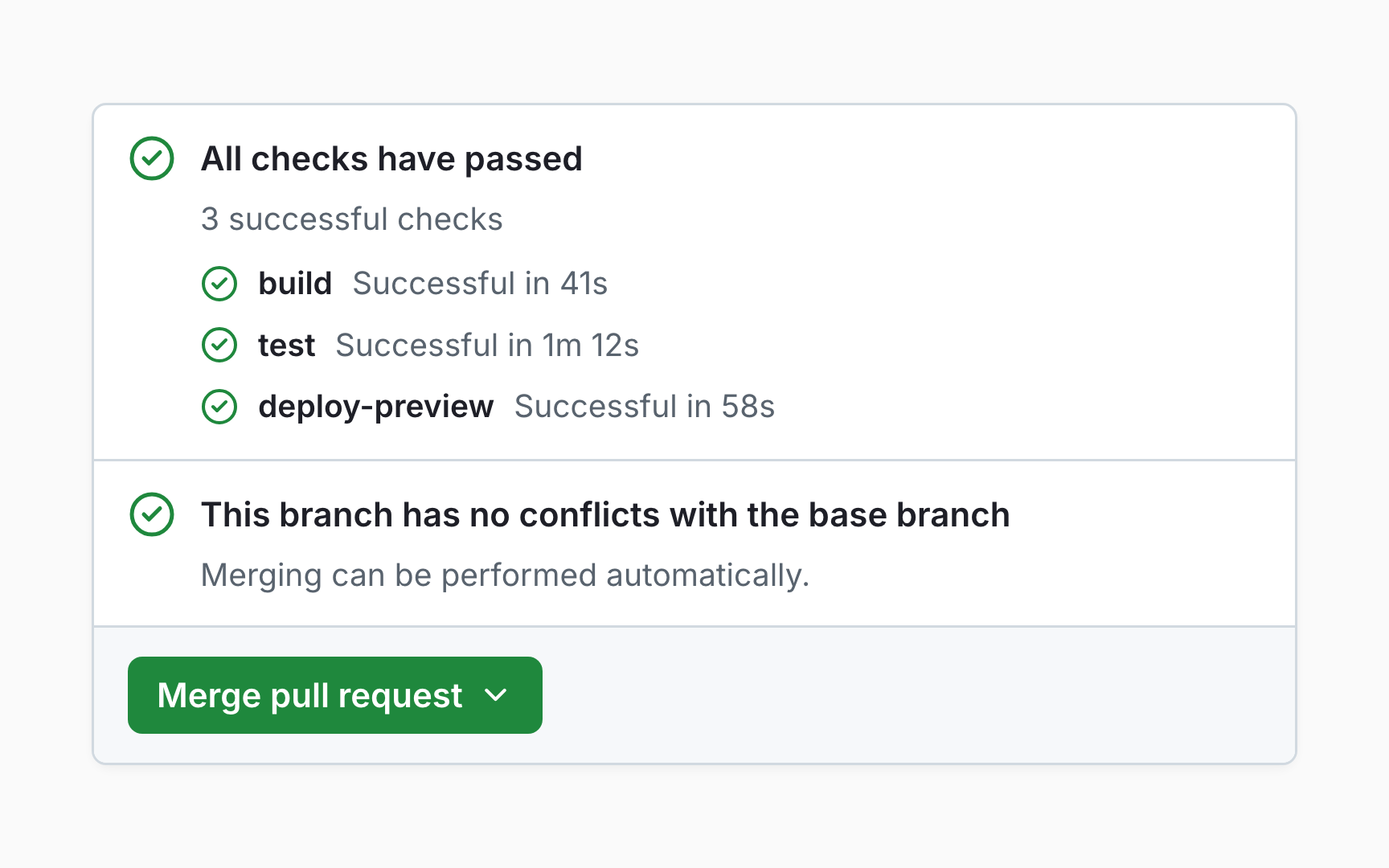
Status checks show whether commits meet the conditions set for a repository, like passing tests or a successful build [2]. The merge box lists them, each marked as passed, failed, or still running.
Some checks are required. When status checks are required for a protected branch, they must pass before the pull request can be merged. Others are informational, and a failure there is still worth reading, even though it won't block anything.
Each check links to its details, where a failure usually explains itself. Reading that page before asking for help often answers the question, even for people who don't write code.
Required reviews and branch protection
Branch protection rules and rulesets set conditions a branch must meet before changes land on it [3]. Common ones require a pull request, a number of approvals, passing status checks, or a branch that's up to date with its base.
Only approvals from people with write or admin access count toward these requirements [4]. Rules can also dismiss approvals when new commits arrive, require review from code owners, or insist that the most recent push is approved by someone other than its author.
Admins can bypass protections by default unless a rule forbids it. For a team, protecting main is the single most effective way to make sure nothing reaches it without review.
Merge commits, squash, and rebase
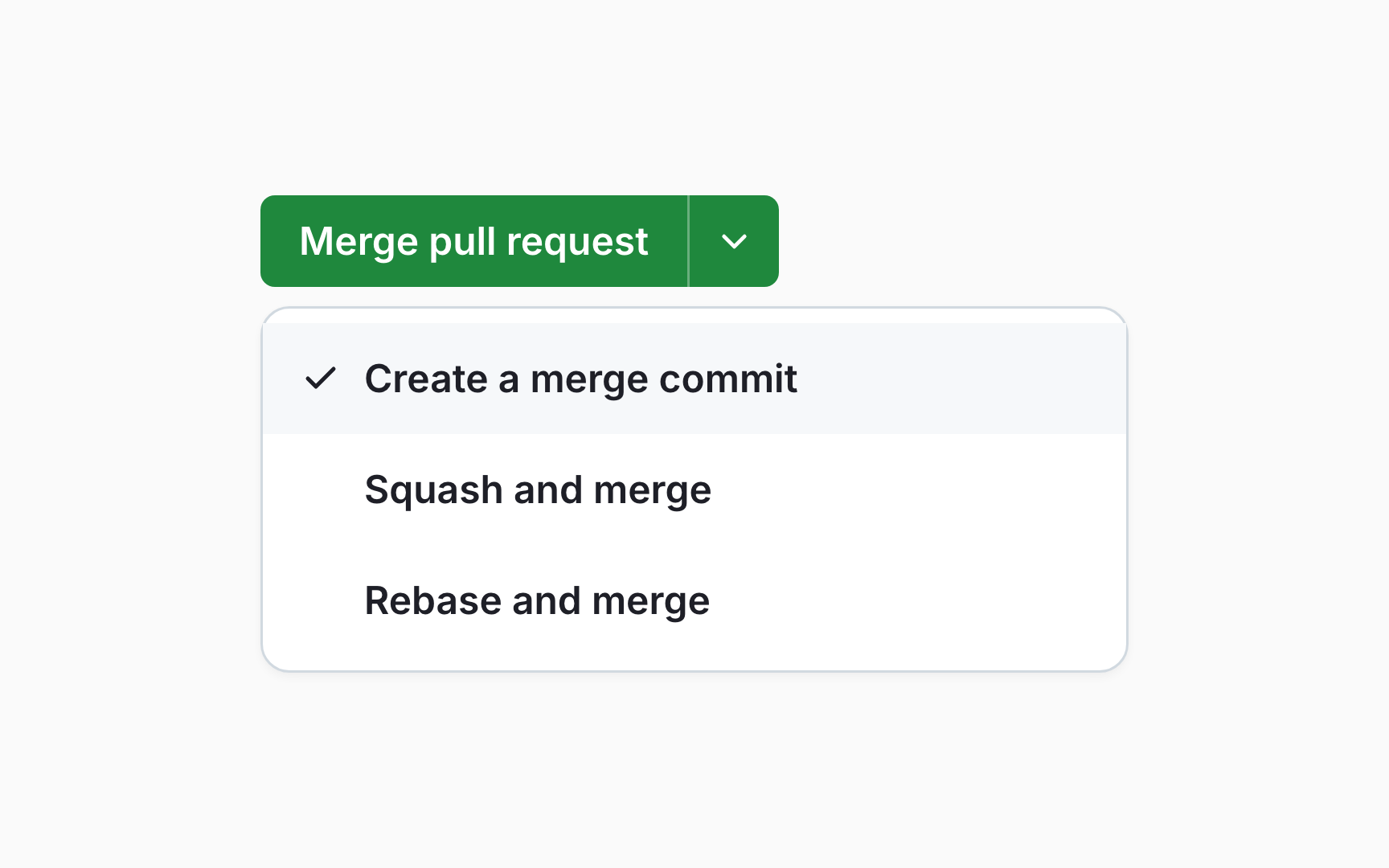
The merge button offers up to three methods [5]:
- Create a merge commit keeps every commit from the branch and adds one that joins the two histories
- Squash and merge combines the branch's commits into a single commit on the base
- Rebase and merge adds each commit onto the base individually, without a merge commit, giving them new IDs
The repository's settings decide which methods are available. Whichever is chosen, the base branch ends up with the same changes. Only the shape of the history differs.
That shape matters later. A history of clear, single commits is easy to read and revert, while a history that keeps every step shows exactly how the work developed.
Choosing squash and merge
Squash merging works best for short-lived branches [6]. A branch full of commits like wip, fix typo, and try again becomes one clear commit on main, with a single message that describes the whole change.
The trade-off is detail. The individual commits disappear from the base branch, though they stay visible in the pull request. For long-running branches where each commit tells part of the story, a merge commit keeps that record.
For AI-built work, squashing is often a relief. Dozens of generated commits collapse into one entry that's easy to read, review later, and revert if needed.
Auto-merge
Auto-merge merges a pull request automatically once all required reviews and status checks pass [7]. Someone with write access selects Enable auto-merge, and GitHub takes it from there.
It's handy when checks take a while or a review is still pending: the pull request merges the moment it's ready, without anyone watching it. The option appears only on pull requests that can't be merged right away, and the repository has to allow it in its settings.
Auto-merge switches itself off if someone without write access pushes new changes to the branch, so a late addition can't sneak in without a fresh decision.
Merges that deploy a live site
On many projects, merging into main starts a deployment. A workflow or hosting service picks up the change and publishes it, so the merge button is effectively the publish button.
Some AI tools make this explicit. v0, for example, merges its pull request into the base branch and then waits for the production deployment [8]. In setups like this, a merged mistake can reach customers within minutes.
Knowing what a merge triggers changes how carefully it's done. Checking the deployment setup once, by asking a developer or looking at the repository's workflows, removes the surprise.
Closing a pull request without merging
Not every pull request should merge. Close pull request, below the comment box at the bottom of the conversation, ends it without merging [9]. The branch, the commits, and the whole discussion stay, and the pull request can be reopened later.
Closing is the right call when an idea was rejected, a better approach appeared, or the work became outdated. A short closing comment explaining why saves the next person from reopening the same debate.
Closing an AI-generated pull request that missed the point is normal, not wasteful. A clear note on what went wrong makes the next attempt better.
Topics
References
- Merging a pull request - GitHub Docs | GitHub Docs
- Status checks - GitHub Docs | GitHub Docs
- About protected branches - GitHub Docs | GitHub Docs
- Approving a pull request with required reviews - GitHub Docs | GitHub Docs
- Pull request merges - GitHub Docs | GitHub Docs
- Pull request merges - GitHub Docs | GitHub Docs
- Automatically merging a pull request - GitHub Docs | GitHub Docs
- GitHub | v0 Docs
- Closing a pull request - GitHub Docs | GitHub Docs