


Every interface a browser shows is the result of a stylesheet, and most of the arguments between design and engineering about spacing, color, and states are arguments about CSS. Designers now read it in Dev Mode, design tokens have to survive into it, and the cost of a visual change depends on how it was written. Reading CSS has become part of a designer's job even when writing it is not, because the stylesheet is where a design's decisions live once the product is built.
In this glossary topic:
- What is CSS?
- What are the core ideas behind CSS?
- How does CSS handle layout and responsive design?
- How does a CSS rule differ from a style in a design tool?
- What does CSS look like in practice?
- What does CSS mean for designers and product managers?
- What are the limits and common misunderstandings of CSS?
- FAQ
What is CSS?
Cascading Style Sheets (CSS) is the stylesheet language that describes how the elements of an HTML document are presented: their color, type, spacing, size, position, and motion. A stylesheet is a list of rules, each pairing a selector, which picks the elements it applies to, with declarations that set properties to values. A single line such as .price { color: #1a1a1a; font-weight: 600; } is a complete rule.
CSS is one of the three languages every web page is built from. HTML gives a page its structure and meaning, CSS gives it its appearance, and JavaScript gives it behavior. The split is deliberate: the same HTML can look entirely different under two stylesheets, and a stylesheet can change without touching the content it styles.
A W3C standard since 1996, CSS is read by every browser. CSS is where a design's visual decisions live once a product is built, which is why it matters to people who never write it.
What are the core ideas behind CSS?
Four ideas explain most of how CSS behaves. Selectors come first: a rule can target elements by tag name, class, id, attribute, a state such as hover or focus, or position relative to other elements. Reaching the right elements and no others is the subject of the Guide to CSS Selectors lesson.
The cascade is the idea in the name. Several rules often apply to the same element, and the cascade decides which wins: declarations flagged as important first, then the more specific selector, then, on a tie, the rule that appears later in the source. In specificity, an id outweighs a class and a class outweighs a tag name. An element's final appearance is the outcome of a contest between rules, not a single assignment.
Inheritance is the third idea: color and font family pass from a parent element to its children unless a child sets its own value, while margin and border never do. The box model is the fourth. Every element renders as a rectangular box made of a content area, padding, border, and margin, and most spacing bugs in built interfaces trace back to which of those layers a value landed on.
How does CSS handle layout and responsive design?
Two layout systems replaced the float and positioning hacks of early CSS. Flexbox arranges items along one axis, a row or a column, and handles alignment, spacing, and wrapping inside a component such as a toolbar. Grid arranges items in two dimensions at once and suits whole-page layouts. Most products use both: grid for the page, flexbox inside the components.
Responsive design rests on two more features. Media queries apply a block of rules only when a condition holds, such as a viewport narrower than a set width or a user who prefers a dark color scheme. Fluid units let values scale without a query: percentages relate to the parent, rem to the root font size, and vw to the viewport width.
Custom properties, usually called CSS variables, store a value under a name such as --color-primary and let any rule read it through var(). They are how design tokens survive into code: a token becomes a custom property of the same name, and changing it in one place updates every rule that uses it. A token that reaches production as a custom property can be changed once; one pasted in as a raw value has to be found everywhere. Transitions ease a property change over time; animations run a keyframe sequence.
How does a CSS rule differ from a style in a design tool?
A style in Figma or a similar tool is a static value: a color style is one color, a text style is one combination of typeface, size, and weight, and applying it sets a layer to exactly that. A CSS rule is conditional. It applies to whatever matches its selector, competes with other rules through the cascade, inherits from ancestors, and changes under a media query or a hover state.
That difference explains the familiar moment when something that looked right in the file looks wrong in the browser: the tool showed one state at one width, while the browser is resolving dozens of rules at once, and the intended one lost the contest or was never written as a rule at all. A design file shows what a screen should look like; a stylesheet decides what it will look like under every condition. Design tokens close part of the gap by giving both sides the same names for the same values, and a good handoff spells out the conditions, breakpoints and states, rather than only the values.
What does CSS look like in practice?
Picture a product card whose text sits too close to its edge in the build but not in the mockup. The designer set a fixed amount of space in the file; the developer set the same amount as margin in CSS; and margin is the space outside the border, not inside it. The fix is a padding value, and the conversation is short when both sides share the vocabulary of the box model. Most spacing disputes between design and engineering are box-model disputes, and the model itself fits in one diagram.
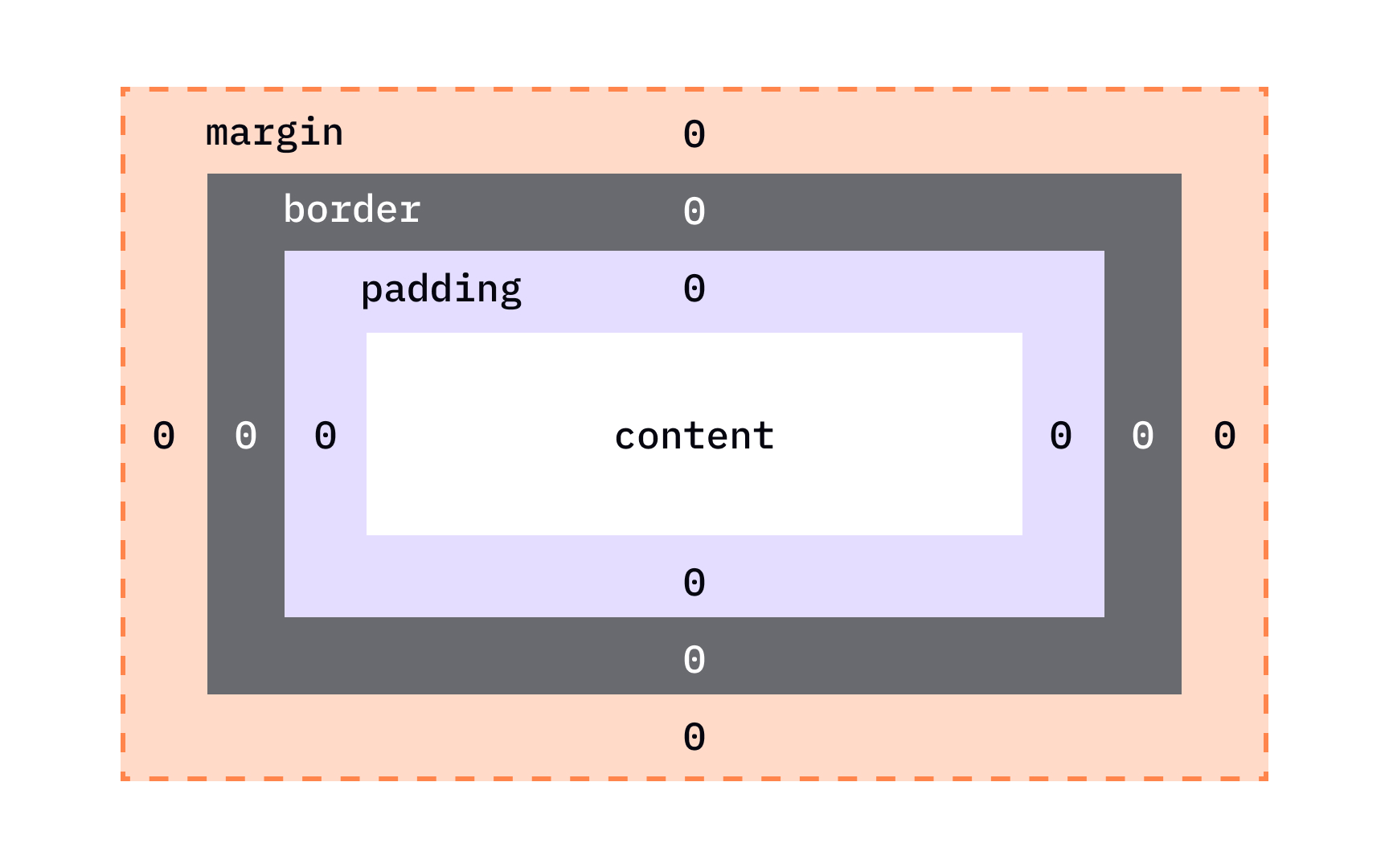
The box model as a browser inspector draws it: the content area at the center, padding inside the border, the border itself, and margin outside it, with each edge's value shown. Width and height apply to the content area unless box-sizing says otherwise, which is why a value applied to the wrong layer moves the wrong thing. From the lesson CSS Box Model.
What does CSS mean for designers and product managers?
Neither role needs to write CSS, but both gain from reading it. Dev Mode in design tools shows the CSS a layer would produce, and a designer who can read a rule can see whether a token was used or a value was hard-coded, and whether a hover or focus state exists at all. A token named for its role survives as a custom property; a token named for its value does not survive a rebrand.
Reading CSS also reveals what is cheap and expensive to change. A color or a type size held in a custom property is a one-line change; a layout that needs a different grid, or a component whose states were never written, is a rebuild. The cost of a visual change is set by how the stylesheet was written, not by how small the change looks in the file.
Accessibility lives partly in CSS as well: focus styles decide whether keyboard users can see where they are, and the reduced-motion media query decides whether animation respects a system setting. A design system that documents those states gives the stylesheet something definite to implement.
What are the limits and common misunderstandings of CSS?
CSS is declarative. A stylesheet states what the result should be and leaves the browser to work out how; for most of its history it had no variables and no logic. Custom properties and calc() have added a little of both, but CSS is still not a programming language in the usual sense, and a change that depends on application state belongs in JavaScript.
Specificity creates its own trouble. When a rule does not take effect, the quick fix is a more specific selector or an !important flag, and each fix makes the next one harder, until the stylesheet is a stack of overrides nobody dares to prune.
Browsers also differ. New features arrive in each engine at different times and old bugs linger, so a layout can look right in one browser and wrong in another. A stylesheet checked in only one browser has not been checked. The cascade, the selectors, and how a browser applies them are where the Introduction to CSS for Designers lesson begins, before any individual property.


