


Most type decisions happen above the baseline, but the letters that dip below it decide how tight a layout can get. A button that clips the tail of a "g", a table row that shaves a "p", or two lines of text whose descenders and ascenders collide are all the same bug, traced to the same zone. The descender is the part of a typeface that most often reveals a component tested with the wrong sample text.
In this glossary topic:

What is a descender?
A descender is the part of a lowercase letter that drops below the baseline. The baseline is the imaginary horizontal line on which most letters appear to rest. For letters like a, e, m, and s, all of the letterform sits on or above this line. For letters like g, j, p, q, and y, part of the form, the tail, loop, or stroke that hangs below, extends below the baseline into what typographers call the descender space.
Descenders are part of the anatomical vocabulary that type designers use to describe and evaluate letterforms. Alongside ascenders (the strokes in letters like b, d, h, and k that extend above the x-height), cap height (the height of uppercase letters), and x-height (the height of lowercase letters without ascenders or descenders), the descender length is one of the proportional characteristics that defines a typeface's overall appearance and behavior in setting.
The amount a descender extends below the baseline, described as descender depth or descender length, varies considerably across typefaces. Fonts designed for editorial or display use often have long, elegant descenders that contribute to a graceful visual rhythm. Fonts designed for functional digital use at small sizes tend to have shorter, more restrained descenders that leave more room for line spacing and render more cleanly in limited pixel space.
How do descenders affect spacing and line height?
Descenders have a direct practical effect on how much vertical space a block of text requires, because they extend the zone that each line of type occupies below its baseline.
Line height (also called leading) must be set to provide enough space for descenders of one line not to collide with ascenders of the line below. If line height is too tight, the descending tail of a g in one line may visually overlap with the ascending stroke of an h in the line below, creating collisions that disrupt reading flow and look like typographic errors.
For body text, a line height of 1.4 to 1.6 times the font size is a widely cited range that accommodates typical descender depths comfortably. Typefaces with unusually long descenders may need line height toward the top of this range. Typefaces with short descenders can sometimes work with slightly tighter settings without collision.
In digital design, this has implications for text within constrained containers. A button with a fixed height that accommodates the cap height but not the descender will clip the tails of lowercase letters in labels containing g, j, p, q, or y. This is a common oversight in component design: the default button height is set by looking at how a test label like "Button" (which has no descenders) appears, and letters with descenders reveal the problem only when a real label is tested.
How do descenders affect UI design decisions?
Beyond line spacing, descenders affect several specific UI design considerations.
In buttons and compact interface elements, the vertical padding must accommodate descenders. A tight button that clips lowercase descenders looks sloppy and unfinished. Testing button height with labels that contain descending letters (g, j, p, q, y) rather than only ascender-free test strings is a necessary QA step.
In truncation, text that's cut off with an ellipsis at a fixed height needs to account for descenders. A text container that shows three lines of text at a fixed height must reserve space for descenders on the visible lines, or the third line will be cut off partway through the descender zone.
In label alignment within components, descenders affect visual centering. Text that appears optically centered is centered on the cap height or x-height zone, not on the full character extent including descenders. Some layout systems center on the baseline, which places descender-heavy text slightly below visual center. This is usually a minor concern but becomes noticeable in tight, icon-adjacent labels or compact data table cells.
In text inputs, the input field's height must accommodate the descender zone below the cursor's position. Fields designed to hold only uppercase characters, like license plate number fields, can sometimes use different height conventions, but fields for general text entry should always accommodate full descender depth.
What does a descender look like in practice?
Type anatomy diagrams mark the descender as the stroke that leaves the baseline. Against the baseline, the descender is the only part of a lowercase letter that sits below the line the rest of the word rests on, which is why it is the first thing to disappear when a container is too short.
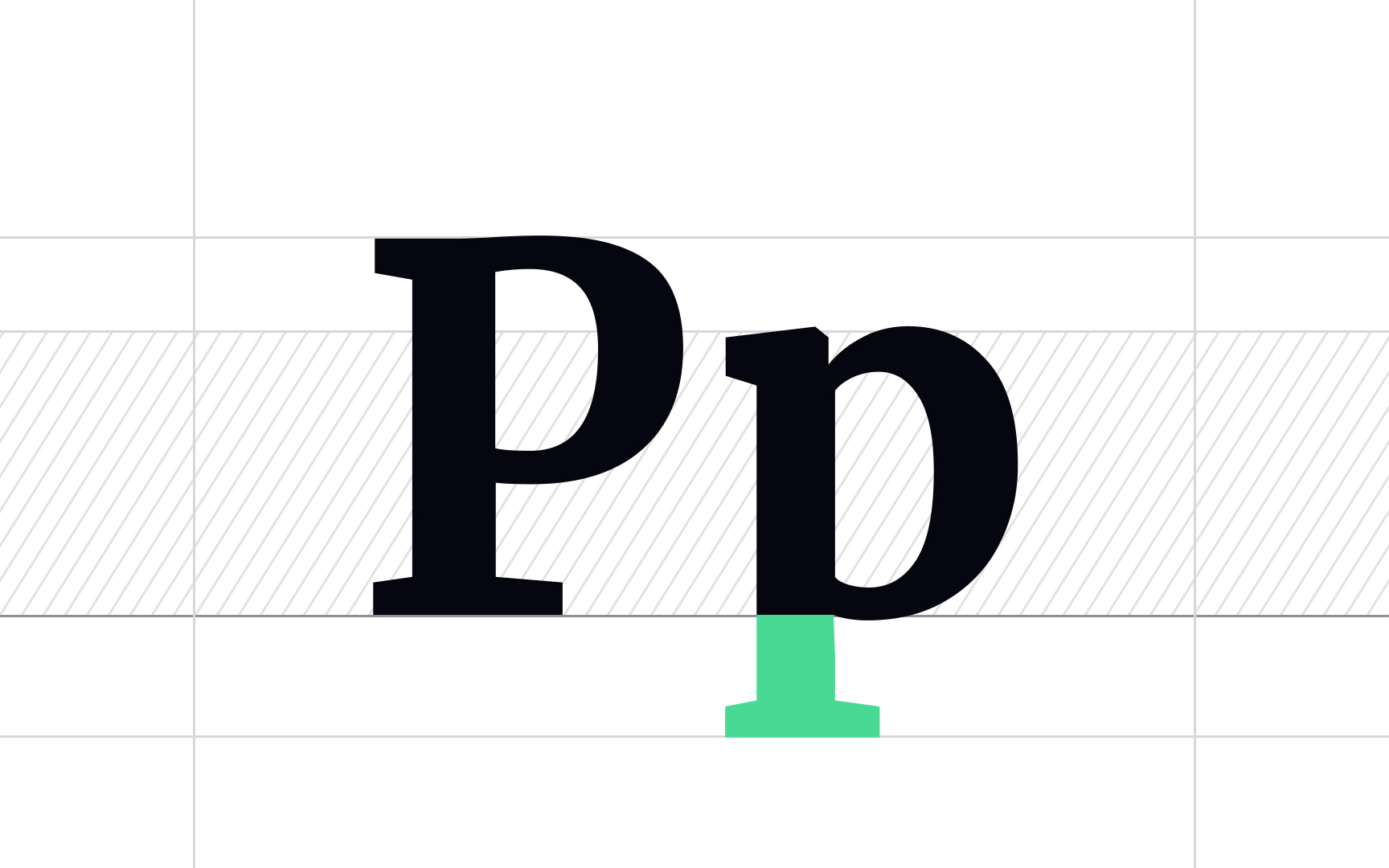
The lowercase p beside its capital: the green stroke is the descender, the only part of either letter that drops below the baseline the rest of the word sits on. From the lesson Characters in Typography.
How do descenders vary across typefaces?
Descender proportions vary significantly and are one of the clearest ways that typefaces communicate different characters.
- Old-style and humanist serif typefaces, like Garamond, Caslon, and Palatino, typically have long, graceful descenders that descend well below the baseline. This gives running text a visual elegance and rhythm that shorter descenders don't produce. The trade-off is that these typefaces require more generous line spacing to avoid collisions.
- Geometric and Neo-Grotesque sans-serifs, like Helvetica, Futura, and many contemporary screen typefaces, tend to have shorter, more compact descenders. This makes them more space-efficient at small sizes and on screens where line spacing is constrained. The character is more neutral and functional.
- Display and decorative typefaces may have dramatically stylized descenders, with sweeping curves, flourishes, or unusual forms that would be distracting at text sizes but add visual character at headline scale. These descender forms are part of the typeface's expressive identity and are one of the areas where type designers' aesthetic choices are most clearly visible.
- Variable fonts, increasingly common for screen use, can sometimes offer control over descender depth as a design axis, allowing the same typeface to be configured with longer or shorter descenders for different contexts.


