

"What's in this version?" is a question product managers and designers hear constantly, from support teams, customers, and their own managers. Answering it by scrolling through commits is slow and easy to get wrong. Releases exist so that nobody has to, and they're also how teams tell users which version fixed a bug or added a feature.
A tag gives a name, like v2.1.0, to one exact point in a repository's history. A release builds on a tag and adds what people need: a title, notes about what changed, and files to download. Version numbers follow a widely used pattern that signals how big a change is, and GitHub can draft release notes automatically from merged pull requests. Tags don't move, so a version number always points to the same code, which makes releases dependable references for support and debugging. Releases can also be marked as early previews or saved as drafts until they're ready.
A good release is a clear record of what shipped. Its notes are written for the people affected by the change, not only for the people who wrote the code. Readers want to know what's new, what's fixed, and whether anything works differently, in plain language.
Tags as named points in history
A tag is a name attached to one specific commit, like v1.0 or v2.1.0. Git lets any point in a project's history be marked as important this way, and teams mostly use tags to mark releases [1].
Unlike a branch, a tag doesn't move. A branch name follows each new commit, but a tag keeps pointing at the same commit for good, so v2.1.0 always means exactly the code that shipped as version 2.1.0. Tags come in two types: lightweight tags are just a pointer, while annotated tags also store who created them, when, and a message.
On GitHub, tags appear in the branch selector under their own Tags tab. That makes it easy to open the code exactly as it was at any past version, which helps when a customer reports a problem in an older release.
Pro Tip! Starting tag names with a v, like v2.1.0, is a common habit that keeps versions easy to tell apart from other names.
Releases built on tags
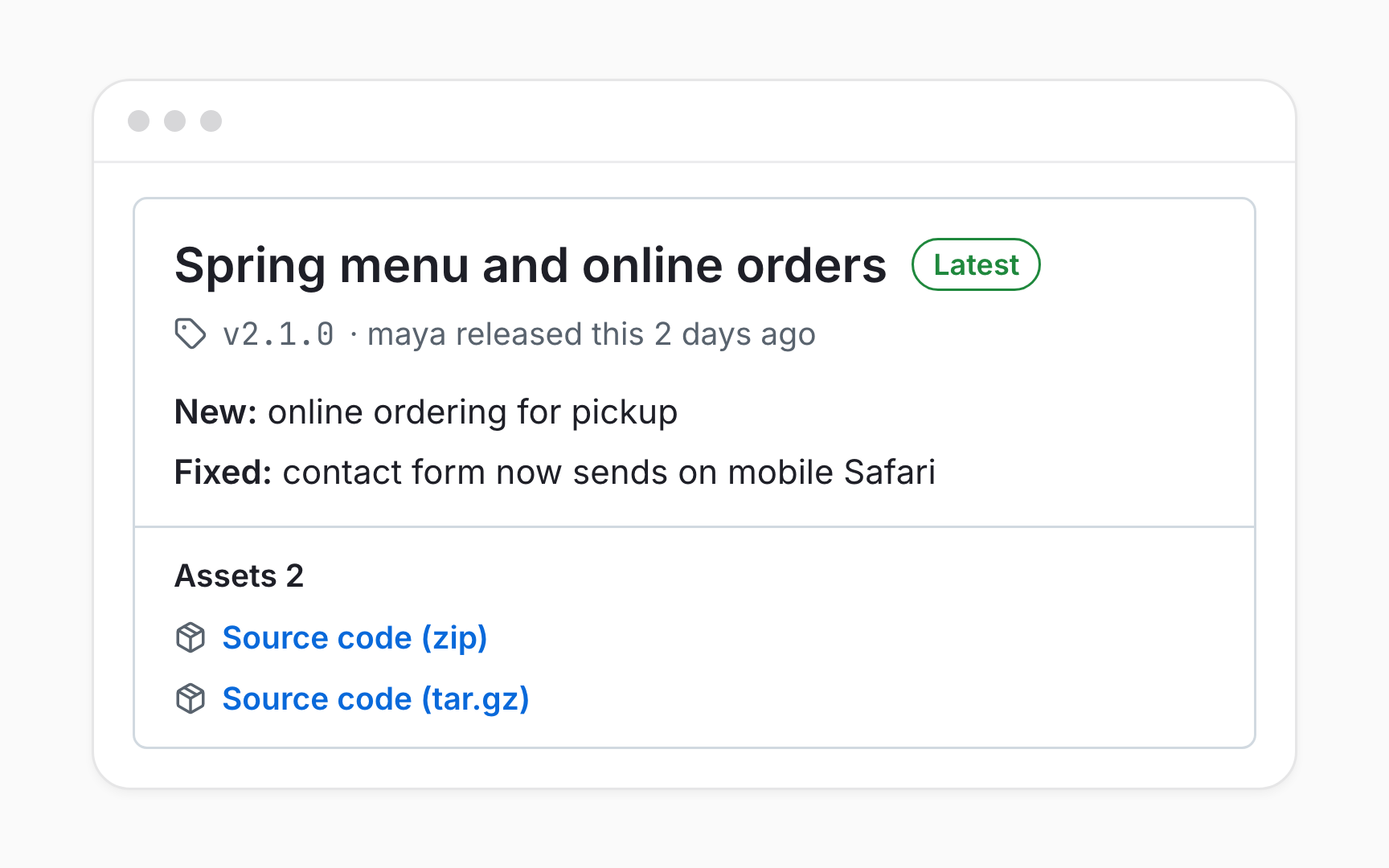
A release turns a tag into something people can read and download. It adds a title, release notes, and optional files, like an installer or a PDF, to a tagged point in history, and GitHub attaches the source code as a zip file and a tarball automatically [2].
Releases live in the Releases section on the right side of a repository's main page. Creating one starts with Draft a new release: choosing an existing tag or typing a new version number to create one, writing a title and notes, and selecting Publish release[3]. The newest full release carries a Latest badge.
Anyone who can read a repository can browse its releases, but only people with write access can create or edit them. That makes the releases page a dependable record of what shipped, kept by the people responsible for it.
Reading version numbers
Most projects number their versions with semantic versioning: three numbers in the form MAJOR.MINOR.PATCH, like 2.1.0 [4]. Each position says what kind of change a release contains.
Each number goes up for a different reason:
- MAJOR for changes that break compatibility, so anything built on the old version may need updating
- MINOR for new features that don't break anything
- PATCH for bug fixes that change nothing else
So 2.1.0 to 2.1.1 is a fix, 2.1.1 to 2.2.0 adds something new, and 2.2.0 to 3.0.0 warns that something now works differently. A suffix like -beta.1 marks an early, unstable version, and versions starting with 0 are reserved for early development, where anything may change at any time.
Writing release notes people read


Release notes are written for the people affected by a release: customers, support teams, and colleagues who weren't in the room. Good notes group changes by what readers care about, like new features, fixes, and anything that now works differently, and describe each one in plain language.
A list of commit messages or pull request titles is a weaker substitute. Entries like Refactor checkout module or Bump dependencies mean little outside the team, and the change that matters most to a customer can get lost among them.
A short summary at the top helps most readers more than any list: one or two sentences about what this version is for. Links to related issues or documentation can follow for anyone who wants the details.
Generated release notes
GitHub can draft release notes automatically. Selecting Generate release notes while drafting a release fills in the pull requests merged since the previous release, the people who contributed, and a link to the full list of changes [5].
A file called .github/release.yml can shape the result. It sorts pull requests into categories by their labels, like New features for enhancement or Fixes for bug, and can leave out pull requests with certain labels or authors, such as automated dependency updates.
Generated notes are a starting point, not a finished product. Pull request titles are written for reviewers, so adding a summary and rewording the most important entries for customers turns a raw list into notes people actually read.
Pro Tip! Labeling pull requests as they're opened means generated release notes sort themselves into the right categories.
Answering what shipped and when
Questions like Is the new checkout live? or Which version fixed the login bug? have dependable answers on the releases page. Each release shows its date, its tag, and its notes, so finding the first release that mentions a fix answers both questions at once.
Releases also make versions easy to compare. Each one links to the changes made since the previous release, and its tag pins the exact code that shipped, which helps when a problem appears in one version but not the next. A tag's date and its release date can differ, since the two can be created at different times [6].
For product managers, this replaces a lot of status chasing. When a team publishes releases consistently, what shipped becomes a link rather than a meeting.
Pre-releases and draft releases
Not every release is ready for everyone. Ticking This is a pre-release tells users that a version isn't ready for production and may be unstable, such as a beta for early testers [7]. Save draft keeps a release unpublished until it's ready.
Pre-release versions usually carry a suffix like 2.2.0-beta.1, and semantic versioning ranks them below the final 2.2.0[8]. The Latest label normally goes to the newest full release, chosen from the version numbers unless someone sets it by hand with Set as latest release.
Drafts suit coordinated launches. The notes can be written and reviewed ahead of time, then published at the moment the product goes live, with nothing visible to customers before then.
Topics
References
- Git - Tagging
- About releases - GitHub Docs | GitHub Docs
- Managing releases in a repository - GitHub Docs | GitHub Docs
- Semantic Versioning 2.0.0 | Semantic Versioning
- Automatically generated release notes - GitHub Docs | GitHub Docs
- About releases - GitHub Docs | GitHub Docs
- Managing releases in a repository - GitHub Docs | GitHub Docs
- Semantic Versioning 2.0.0 | Semantic Versioning