


Products rarely fail at a single screen. They fail between the ad that set an expectation, the signup that half met it, the support ticket nobody answered, and the renewal email that arrived anyway. Customer journey mapping is how teams see that whole sequence at once, in the customer's order rather than the org chart's. A journey map turns scattered complaints and metrics into one picture of where the experience breaks, which is the only view from which the right fix is obvious.
In this glossary topic:
- What is customer journey mapping?
- What does a customer journey map include?
- How does customer journey mapping differ from user journey mapping and service blueprinting?
- Why does customer journey mapping matter for product teams?
- How has customer journey mapping changed with AI?
- What does customer journey mapping look like in practice?
- How to learn customer journey mapping
- FAQ

What is customer journey mapping?
Customer journey mapping is the practice of charting a customer's complete experience with a product, service, or organization, from first awareness through purchase, use, support, and renewal, as a sequence of stages with the customer's actions, thoughts, emotions, and touchpoints laid out under each one. The output is a customer journey map; the practice is the research, synthesis, and decision-making that produces it and keeps it in use.
The method exists because experience is cumulative and teams are not. Marketing owns the ad, product owns the onboarding, and support owns the ticket, but the customer lives through all three as one story. Mapping puts that story on a single surface so the handoffs, gaps, and contradictions between teams become visible as what they are: moments in someone's day.
What does a customer journey map include?
A map is a grid. Stages run across the top in the order the customer moves through them, such as discovery, research, consideration, purchase, onboarding, and ongoing use. Layers run down the side, and each layer answers one question about every stage.
- Actions record what the customer actually does at each stage: searches, compares, signs up, calls support.
- Thoughts and feelings capture what they are asking themselves and how the stage feels, often drawn as an emotional curve that rises and dips across the journey.
- Touchpoints list where the interaction happens: website, app, email, store, phone, a partner, a review site.
- Pain points mark the moments of friction, confusion, or abandonment, and opportunities mark where a change would pay off.
Mature maps add a backstage layer for the internal processes, systems, and people that produce each touchpoint, which is where a journey map starts to shade into a service blueprint. The layers are a menu, not a checklist: a map carries the layers its objective needs and leaves the rest out.
How does customer journey mapping differ from user journey mapping and service blueprinting?
The three are cousins that differ by scope and direction. A customer journey map covers the whole relationship across channels and time, including the stages that happen before anyone opens the product. A user journey map zooms into one product and follows a user through a task or goal inside it, closer to the screens and further from the sales call. A service blueprint keeps the customer's stages but spends most of its rows below the line of visibility, documenting the frontstage staff, backstage processes, and systems that have to work for each touchpoint to happen.
Teams pick by the decision in front of them. Choosing the wrong map type produces a beautiful artifact that answers a question nobody asked, which is the most common way mapping efforts die.
Why does customer journey mapping matter for product teams?
Mapping moves debate from opinion to evidence. When a product manager, a designer, and a support lead argue about what to fix next, a map built from real research settles it by showing where the emotional curve drops and which touchpoints sit under the drop. Prioritization becomes a conversation about moments that matter rather than a contest of loudest stakeholder.
It also protects teams from optimizing locally. An onboarding flow can test perfectly in isolation and still fail because the ad that preceded it promised something else. A map makes that dependency visible before the redesign ships. And because the artifact is shared, it aligns functions that otherwise never meet: the same map that guides a designer's wireframes can guide a retention team's outreach timing.
How has customer journey mapping changed with AI?
The synthesis step has compressed. Interview transcripts, support tickets, reviews, and analytics exports that once took a team a week to cluster into stages and emotions can now be sorted in hours with AI features built into research repositories and whiteboarding tools like Dovetail, Miro, and FigJam. Some teams also run journey analytics that reconstruct real paths from behavioral data and flag drop-offs automatically.
What has not changed is the part that makes mapping worth doing. The objective still has to be set by people who understand the business decision, the inputs still have to come from real customers rather than synthetic ones, and the map still has to be read by the team that will act on it. AI shortens the distance from raw data to a draft map; it does not shorten the distance from a map to a decision.
What does customer journey mapping look like in practice?
The example below is the working shape of a map: stages across the top, one row per layer, and a cell where each layer meets each stage. Reading down a column shows everything that is true about one moment; reading across a row shows how one dimension, say touchpoints, evolves through the whole journey.
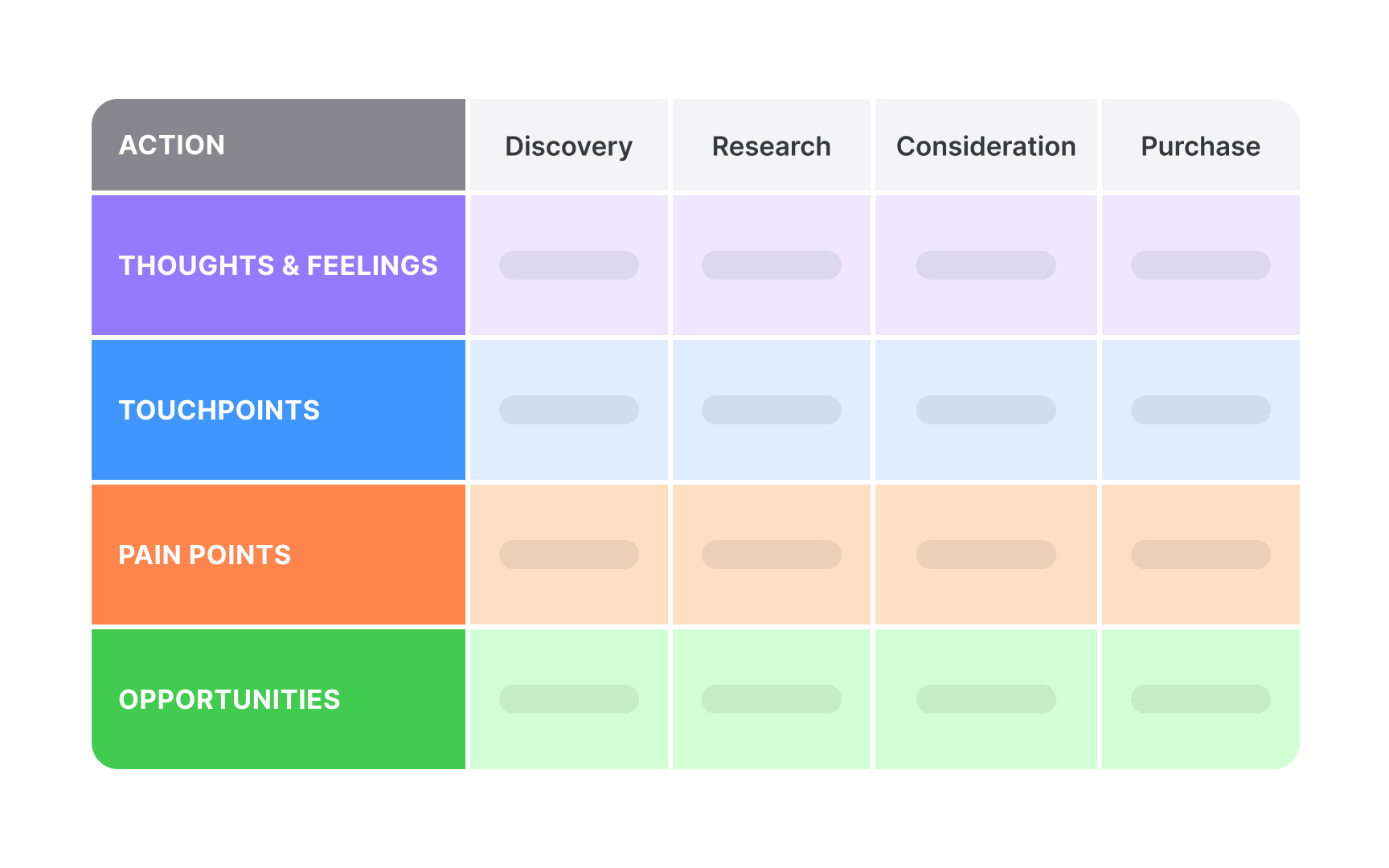
The swimlane layout: each row is a layer, each column a stage. The grid is what lets a room of stakeholders point at the same cell. From the lesson V = Visualize.
The emotions layer is the one teams most often skip and most often regret skipping. Plotting how a customer feels at each stage, from excitement at discovery through anxiety during research to relief at evaluation, exposes the moments where the experience earns loyalty or loses it, which the actions layer alone will never show.
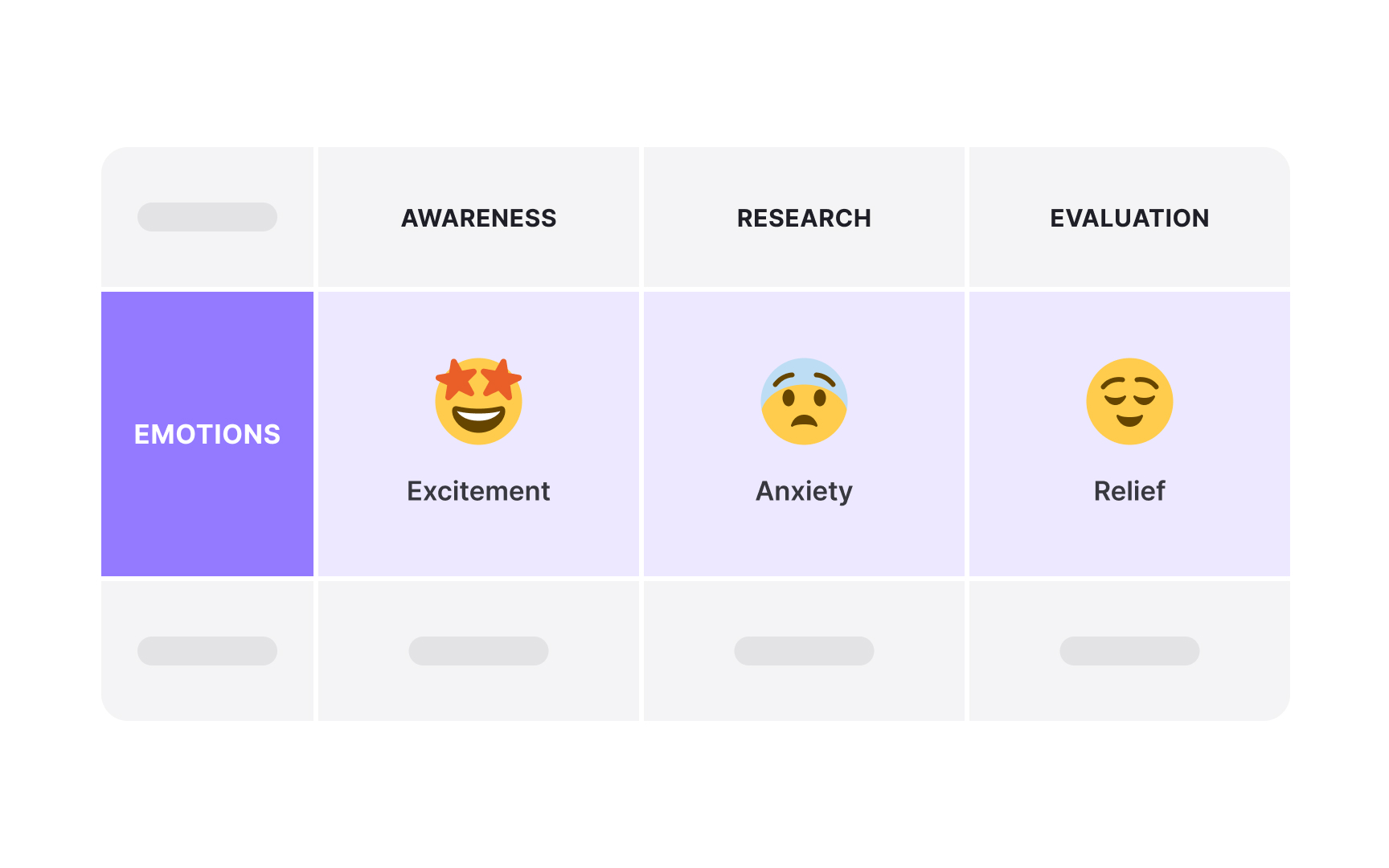
One layer, read across three stages. The dip in the middle is where a competitor's clearer pricing page wins the customer, and no funnel metric would have named it.
How to learn customer journey mapping
Foundations: what a map is and which kind to build
Mapping starts with knowing what the artifact can and cannot do. The What is Journey Mapping lesson sets out the method, when it is worth the effort, and who needs to be in the room. The Types of Journey Maps lesson then separates the family: the customer journey map for the whole relationship, the user journey map for a single product, the service blueprint for what happens backstage, and the user flow for screen-level paths. Picking the right one is the first real decision.
Setting the objective and choosing the layers
A map without an objective becomes wall decoration. The O = Objective lesson covers how to frame the business or design question the map has to answer, and the L = Layers lesson walks through each layer, from actions and touchpoints to emotions, pain points, and backend processes, and how to select only the ones that objective needs. Maps built around personas rather than an average customer stay specific enough to act on.
Gathering inputs
A map is only as honest as what feeds it. The I = Inputs lesson covers the research and data sources that fill the cells: user interviews, analytics, support logs, and field observation, and how to weigh what customers say against what the data shows they do. Teams that start with user research discipline produce maps that survive their first stakeholder challenge.
Extracting insights and framing them for impact
The filled grid is raw material. The E = Extract lesson covers reading a map for bottlenecks, emotional friction, and the moments that matter most to the outcome, and the Framing Insights and Findings for Impact lesson covers turning those readings into a narrative stakeholders will fund. The empathy map is the natural companion here for going deeper on a single stage.
Turning the map into action
Insight that never becomes a backlog item was expensive research. The Prioritizing and Planning Improvements lesson covers converting pain points into ranked, scoped work, and the R = Revamp lesson covers redesigning the touchpoints that the map flagged. For the long form on why so many mapping efforts stall between the wall and the roadmap, the article on journey mapping that drives change is the deep guide.
Making mapping stick
The difference between a mapping project and a mapping practice is what happens after the first map. The Embedding Maps into Delivery lesson covers keeping maps live inside product delivery, the Building a Mapping Culture lesson covers the organizational habits that keep them current, and the Journey Management and Mapping Architecture lesson covers connecting many maps into one system. At that scale, mapping becomes a core method of service design and a shared language for customer experience work across the organization.


