


Pull down on a list and it refreshes; swipe a row and a delete button slides out; type three letters and suggestions appear. Nobody taught these moves, and nobody had to, because the behavior is the same across thousands of apps. Interaction patterns are that shared behavior, and they matter more as products move to touch, voice, and AI interfaces where there is no visible control to click. A product's layout can be new on every screen, but its behavior has to be familiar on the first try, and interaction patterns are how that familiarity is built.
In this glossary topic:
- What are interaction patterns?
- How do interaction patterns differ from design patterns, components, and microinteractions?
- What are common interaction patterns?
- Where do interaction patterns come from?
- When should a designer follow a pattern and when invent one?
- What does an interaction pattern look like in practice?
- How do interaction patterns handle accessibility?
- What do interaction patterns mean for designers?
- FAQ

What are interaction patterns?
Interaction patterns are reusable solutions for how an interface responds to a user's action over time: the behavior, the states it passes through, and the feedback it gives, as distinct from its layout or visual form. A pattern says what happens when the user pulls, drags, types, or waits. It does not say what color the control is or where it sits on the screen.
Every interaction pattern has the same three parts: a trigger, which is the user's action or a system event; a sequence of states the interface moves through in response; and the feedback that tells the user which state they are in. Pull to refresh has a pull, a threshold, a loading state, and a settle; inline validation has a blur, a check, and a message. A pattern is the behavior with the pixels removed, which is why the same pattern can look different in two products and still feel identical to use.
How do interaction patterns differ from design patterns, components, and microinteractions?
The four terms describe nested layers of the same work. A design pattern is the whole solution to a recurring problem, from the problem statement to the layout to the behavior. An interaction pattern is the behavioral slice of that solution. A UI component is one built implementation, with code, tokens, and a place in the library. Microinteractions are the smallest unit: a single contained moment with a trigger, rules, feedback, and sometimes a loop.
A wizard shows the layering. The design pattern covers the step structure, the progress display, and what back means. The interaction pattern is what the back action does to entered data, how the step change is animated, and what the user sees while the next step loads. The stepper control at the top is a component, and the checkmark that animates when a step completes is a microinteraction. A microinteraction is one moment; an interaction pattern is the reusable shape of many such moments, and a design pattern is the problem-level solution that contains them. Confusing the layers matters because each is documented, owned, and tested differently.
What are common interaction patterns?
Grouped by what the user is doing, the common patterns come down to a handful of behaviors. When the user is manipulating content directly: drag and drop, swipe to reveal or delete, pinch to zoom, and long press to open a secondary action. These are gesture patterns, and most of them exist only on touch screens.
When the user is moving through content: infinite scroll, pull to refresh, pagination, lazy loading, and skeleton screens that hold the shape of content while it arrives. When the user is editing: inline editing in place rather than on a separate screen, autosave with a visible saved state, autocomplete, and undo offered after an action instead of a confirmation before it.
When the user is waiting: determinate and indeterminate progress indicators, loading states, and optimistic UI, which shows the result of an action immediately and reconciles with the server afterward. When the user is recovering: undo, empty states that explain what will appear and offer a first step, and inline validation that marks a field as soon as it loses focus. Nearly every screen combines patterns from several of these groups, and the platform-specific versions of the touch patterns are the subject of the Mobile-Specific Functions & Interactions lesson.
Where do interaction patterns come from?
Most patterns are platform conventions first. Apple's Human Interface Guidelines and Google's Material Design each specify how their platforms scroll, swipe, select, navigate back, and present sheets and dialogs, and users carry those expectations from one app to the next. The web's conventions are older and looser: links underline, forms submit on enter, scrolling is continuous. Some patterns began in one product and spread; pull to refresh was popularized by a third-party Twitter client before the platforms adopted it.
Inside an organization, the design system is where patterns get recorded, and the useful entries describe states and transitions rather than screens: what the control looks like at rest, on hover, on focus, while pressed, while loading, when disabled, and on error, and how it moves between them. A pattern is only reusable once its states are written down, because a screenshot of a finished screen shows one state and hides the other six.
When should a designer follow a pattern and when invent one?
The default is to follow, because a familiar pattern costs the user nothing to learn and an unfamiliar one costs attention on every use until it is learned. The mental model a user brings to a new app was built by every other app on the device, and a product that breaks it has to be better by at least the amount of relearning it demands.
Invention is justified when the pattern was built for a different context, when the product's core action is the differentiator, or when the existing pattern measurably fails in testing. Even then, the new interaction needs a visible affordance or a one-time hint, because a gesture nobody can see is a feature nobody finds. A novel interaction is a hypothesis with a learning cost attached, and the test is whether users perform it unprompted on the second session, not whether they liked it in the first.
What does an interaction pattern look like in practice?
The gesture vocabulary of a touch platform is a set of interaction patterns in its purest form: each gesture is a behavior with no visual form of its own, and it works only because people carry it from app to app. Tap, double tap, long press, swipe, pinch, and rotate each map to an expected result, and a product that reassigns one of them is spending the familiarity it inherited. A gesture is a pattern the platform taught before the product arrived, which is why inventing a new one costs more than reusing an old one.
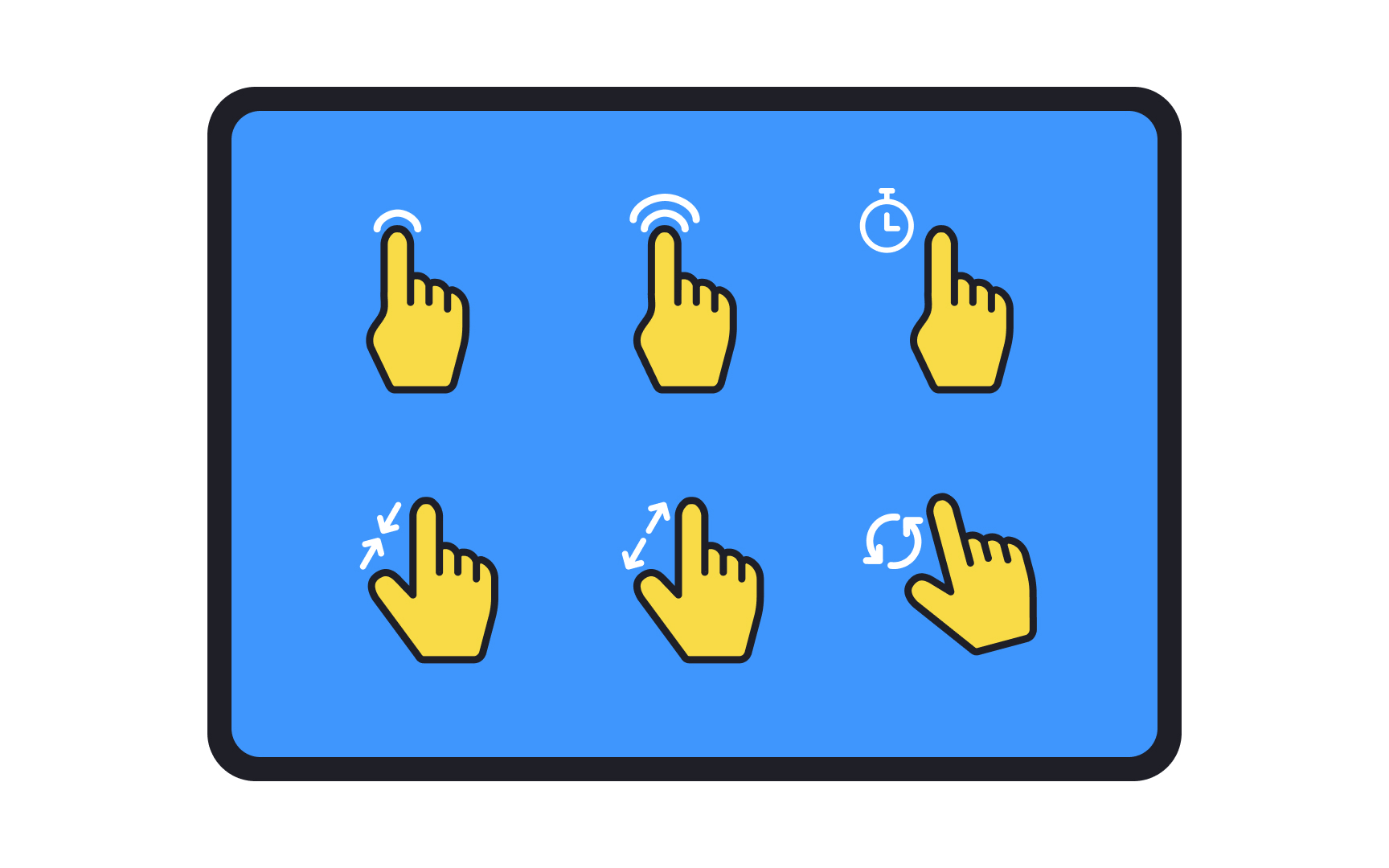
The standard touch gestures laid out on a tablet: tap, double tap, long press, swipe, pinch, and rotate. Each one is a behavior users already know, so an interface that honors them gets its interaction patterns for free and one that reassigns them has to teach the difference. From the lesson Designing for Tablets.
How do interaction patterns handle accessibility?
Every gesture pattern needs a non-gesture equivalent. Swipe to delete needs a visible delete action reachable by tap or keyboard; drag and drop needs a move command; pinch to zoom needs zoom controls. WCAG's pointer gestures criterion requires that anything operable with a multipoint or path-based gesture also work with a single pointer, and screen readers replace most gestures with their own. Keyboard and screen-reader behavior is part of the pattern, not an addition to it: a custom dropdown that the keyboard cannot open has implemented half the pattern.
Motion patterns carry their own requirement. Transitions, parallax, and animated loading states should respect the operating system's reduced-motion setting, which browsers expose through a media query, so the pattern still communicates state change without the movement. An interaction pattern is complete only when it works without the gesture, without the mouse, and without the motion, and accessibility review is where the missing paths show up.
What do interaction patterns mean for designers?
Specifying a pattern means specifying states and transitions, not screens. A static mockup shows a list; the pattern needs the list at rest, mid-pull, loading, refreshed, failed, and empty, plus the timing and easing between them.
Because behavior cannot be judged from a still image, patterns get prototyped rather than drawn: a clickable prototype for the state sequence, a motion prototype for the timing. The result then goes into the design system as a documented pattern, with its trigger, its element states, its feedback, its accessible equivalents, and the cases where it should not be used; the UI Component States lesson covers the states a single control passes through, and a pattern is that idea applied to a whole behavior. A designer who ships screens leaves the behavior to whoever builds it, and the behavior is where most of the usability lives.


